
How to replace rear hub seal Cropmaster to 900
- Jun 19
- 2 min read
How to replace rear hub seal, Cropmaster to 900
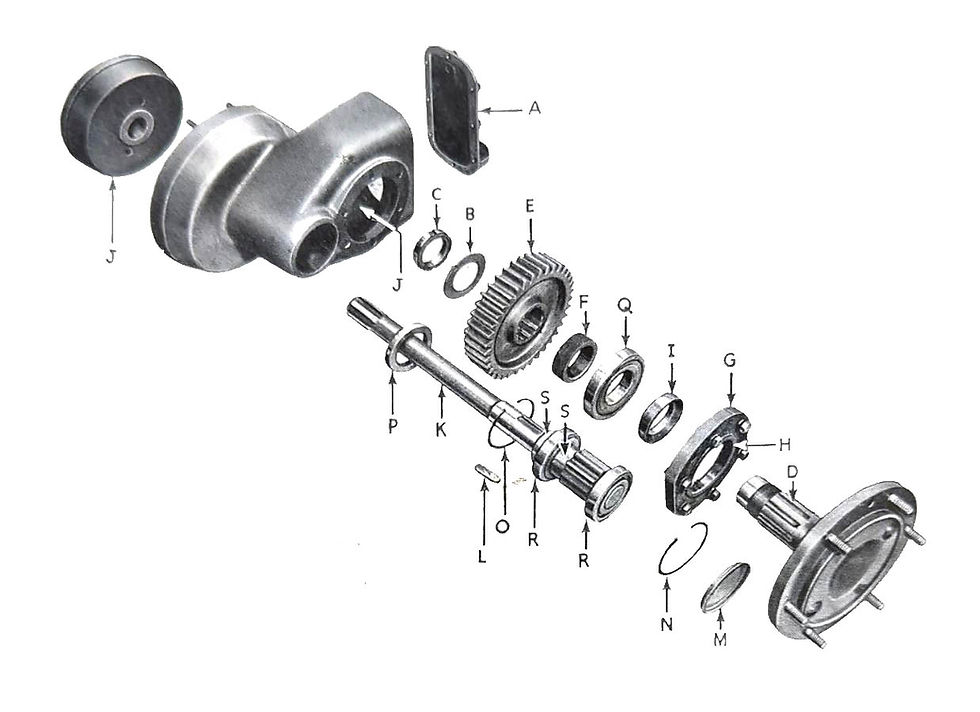
With reference to the drawing above.
1. Lift the rear wheel off the ground, remove it and replace the wheel nuts onto the studs.
2. Make sure that the tractor is secure on axle stands or wooden blocks.
3. Remove rear cover A.
4. Straighten the tab on the lock washer B.
5. Engage the special spanner 41254 with the ring nut C.

6. Turn the hub D anticlockwise as far as the spanner handle allows.
7. Rotate the hub anticlockwise further by using a long bar through the wheel nuts.
8. Fully release the hub using 2 x 19291S setscrews in the threaded holes in the hub.

9. Remove the seal carrier H, remove the seal and clean the carrier.
10. Clean sediment from bottom of final drive housing
11. Remove the wear collar I and check it for wear. If replacement is required measure the inside diameter. There are 3 different sizes, 2.5 inches, (13369), 2.75 inches (67187), and 70 mm. (35925).

13369 Wear Collar 2.5" 
67187 Wear Collar 2.75" 
35925 Wear Collar 70mm
12. Refit the wear collar to the hub shaft using a sealant to prevent oil from seeping out.
13. Fit the new seal, part no.12920 to the carrier

14. Refit the assembly to the final drive casing using a new gasket, part no. 13376.

15. Refit the hub assembly in the reverse order to removal. New lock washers, part no. 13367 are available if required.

A specific torque was not specified but use a bar 2 to 3 metres long to tighten correctly.
16. Secure the ring nut with the lock washer.
17. Replace the rear cover using a new gasket, part no. 30806

18. Fill final drive with 2 Litres of SAE140 gear oil (not EP).

19. Refit wheel and lower to ground.



Comments